

Introduction
One of the biggest reasons beginner traders lose money is simple: they start trading with real cash before developing a profitable strategy. Many new traders jump into stocks, forex, or crypto markets without understanding chart patterns, risk management, or trade execution. As a result, costly mistakes happen quickly.
This is where TradingView Paper Trading becomes valuable. It allows you to practice trading using virtual money while following real market prices. You can test strategies, learn how orders work, and build confidence without risking your hard-earned capital.
What is TradingView Paper Trading?
TradingView Paper Trading is a simulated trading feature built directly into the TradingView platform. It allows traders to buy and sell financial assets using virtual funds instead of real money.
The system uses live market price data, which means your trades are executed based on actual market conditions. This creates a realistic environment where you can practice trading without financial risk.
When you connect the paper trading account, TradingView typically provides a default virtual balance of $100,000. While this sounds great, most beginner traders should adjust the balance to match the amount they plan to trade in real life.
For example:
- If your future trading account will be $1,000, set your paper trading account to $1,000.
- If you plan to start with $5,000, use a $5,000 virtual balance.
- Avoid practicing with unrealistic account sizes.
The goal is not to make virtual millions. The goal is to develop skills and consistency that can eventually be applied to a real trading account.
Benefits of TradingView Paper Trading
- Zero financial risk
- Real-time market data
- Learn order execution
- Practice risk management
- Test trading strategies
- Build confidence before live trading
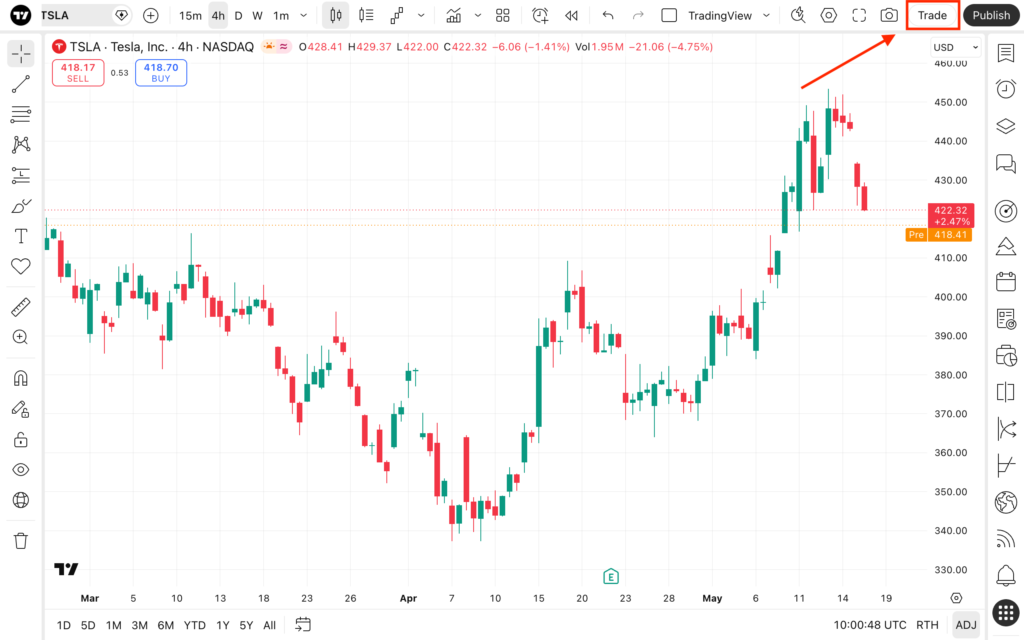
Step-by-Step Setup Guide
Getting started with TradingView Paper Trading takes only a few minutes.
Step 1: Open a Free TradingView Account
Visit TradingView and create a free account.
You can sign up using:
- Email address
- Google account
- Apple account
- Social login options
Once your account is created, log in and open the TradingView dashboard.
Step 2: Open Any Chart and Click the “Trading Panel”
Choose any market you want to practice on.
Examples include:
- AAPL (Apple Stock)
- EUR/USD
- GBP/USD
- BTC/USD
- Gold (XAU/USD)
After opening the chart:
- Look at the bottom of the screen.
- Find the Trading Panel tab.
- Click it to open available broker connections.
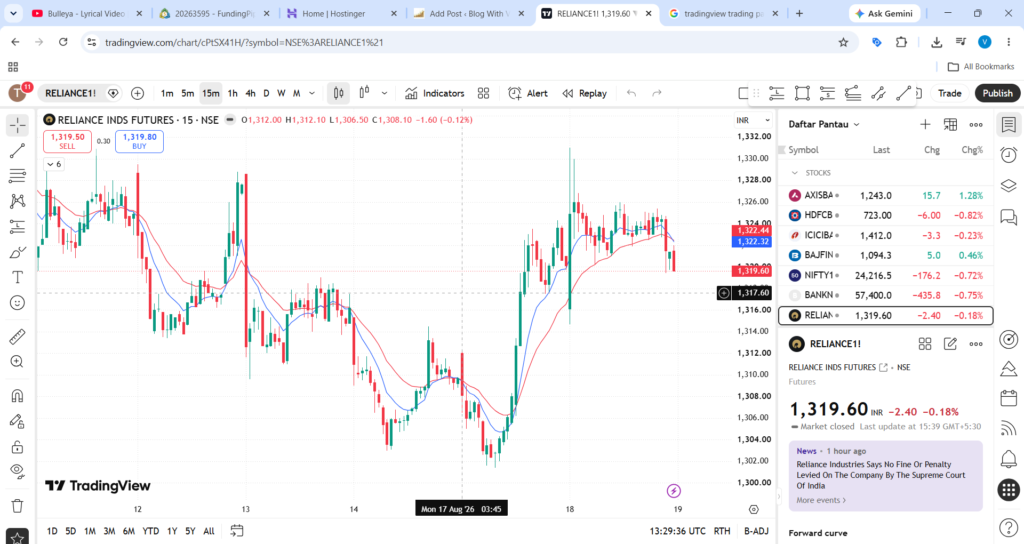
Step 3: Select “Paper Trading by TradingView” and Click “Connect”
Inside the Trading Panel, you will see multiple broker options.
Find:
Paper Trading by TradingView
Click:
Connect
Within a few seconds, TradingView will activate your virtual trading account.
You will now see:
- Account balance
- Buying power
- Open positions
- Trade history
- Order management tools
At this point, you are ready to place your first simulated trade.
[INSERT SCREENSHOT: Connect Paper Trading Account]
Step 4: Reset Your Balance to Match Your Real Budget
This step is often ignored by beginners.
Trading with a virtual balance of $100,000 can create unrealistic habits if you only plan to trade with $1,000 or $5,000 in real life.
To adjust the account:
- Click the Gear Icon.
- Select Reset Account.
- Enter your preferred starting balance.
- Confirm the reset.
Examples:
- Future live account = $1,000 → Set paper account to $1,000.
- Future live account = $2,500 → Set paper account to $2,500.
- Future live account = $5,000 → Set paper account to $5,000.
This helps you practice proper position sizing and realistic risk management.
[INSERT SCREENSHOT: Reset Account Settings]
How to Place Your First Simulated Trade
Now that your paper trading account is ready, it’s time to place a trade.
Right-click on the chart or click the Buy/Sell buttons available on TradingView.
An order ticket will appear.
Market Orders
A market order executes immediately at the current market price.
Example:
- Bitcoin is trading at $60,000.
- You click Buy Market.
- The order fills instantly near the current market price.
Use market orders when speed is more important than price precision.
Limit Orders
A limit order executes only when price reaches your chosen level.
Example:
- EUR/USD trades at 1.1000.
- You want to buy at 1.0950.
- Place a Buy Limit Order at 1.0950.
The order remains pending until price reaches that level.
Limit orders help traders enter positions at better prices.
Stop Loss (SL)
A Stop Loss automatically closes a trade if the market moves against you.
Example:
- Entry: $100
- Stop Loss: $95
If price falls to $95, the trade closes automatically, limiting losses.
Every trader should use stop losses.
Take Profit (TP)
A Take Profit automatically locks in profits when a target is reached.
Example:
- Entry: $100
- Take Profit: $110
When price reaches $110, TradingView closes the trade and secures the gain.
Using both Stop Loss and Take Profit helps maintain discipline.
[INSERT SCREENSHOT: Order Entry Window with SL/TP]
3 Practical Strategies to Test First
Once you understand order execution, start testing simple trading strategies.
1. Candlestick Pattern Breakouts (Support & Resistance)
This is one of the easiest strategies for beginners.
How it works:
- Identify support and resistance levels.
- Wait for price to break above resistance or below support.
- Enter after confirmation.
- Place stop loss beyond the breakout area.
Common breakout candles:
- Bullish Engulfing
- Bearish Engulfing
- Strong Momentum Candles
- Pin Bars
Paper trading allows you to observe how often breakouts succeed or fail before risking real money.
[INSERT SCREENSHOT: Breakout Example]
2. RSI Divergence Signals
The Relative Strength Index (RSI) helps identify momentum shifts.
Bullish Divergence:
- Price creates lower lows.
- RSI creates higher lows.
Bearish Divergence:
- Price creates higher highs.
- RSI creates lower highs.
Many traders use RSI divergence to spot possible reversals before they happen.
Practice identifying these setups on different markets such as stocks, forex, and crypto.
[INSERT SCREENSHOT: RSI Divergence Example]
3. Moving Average Crossover Setups
Moving averages are popular because they simplify trend identification.
A simple setup:
- 50 EMA
- 200 EMA
Bullish Signal:
- 50 EMA crosses above 200 EMA.
Bearish Signal:
- 50 EMA crosses below 200 EMA.
This strategy works well for trend-following traders and is easy to test using paper trading.
Track at least 20–30 trades before deciding whether the strategy fits your trading style.
[INSERT SCREENSHOT: Moving Average Crossover]
Common Paper Trading Mistakes to Avoid
Paper trading is useful, but only if used correctly.
1. Treating Virtual Money Like Fake Cash
This is the biggest mistake beginners make.
Examples:
- Risking 50% of the account on one trade
- Opening extremely large positions
- Taking random trades without analysis
Even though the money is virtual, you should treat it exactly like real capital.
A good rule is to risk only 1–2% per trade.
2. Ignoring Slippage, Commissions, and Emotional Discipline
Paper trading is not identical to live trading.
Real markets may include:
- Broker commissions
- Spreads
- Slippage
- Emotional pressure
Many traders perform well in simulation but struggle when real money is involved.
To reduce this gap:
- Follow strict risk management.
- Keep a trading journal.
- Use realistic position sizes.
- Record wins and losses honestly.
The closer your paper trading behavior matches real trading behavior, the more valuable your practice becomes.
[INSERT SCREENSHOT: Trading Journal Example]
Final Thoughts
TradingView Paper Trading is one of the best ways for beginners to learn trading without risking real money. By practicing with realistic account sizes, using proper risk management, and testing proven strategies, you can develop valuable trading skills before entering live markets. Open a free account, place your first simulated trade, and start building experience today.
[INSERT TRADINGVIEW BUTTON HERE]